

Animate a group
Apply an entrance to multiple selected elements.
Motion StudioGrouped entrance
Bring a group of elements into view in a clear sequence.
Build a more natural entrance
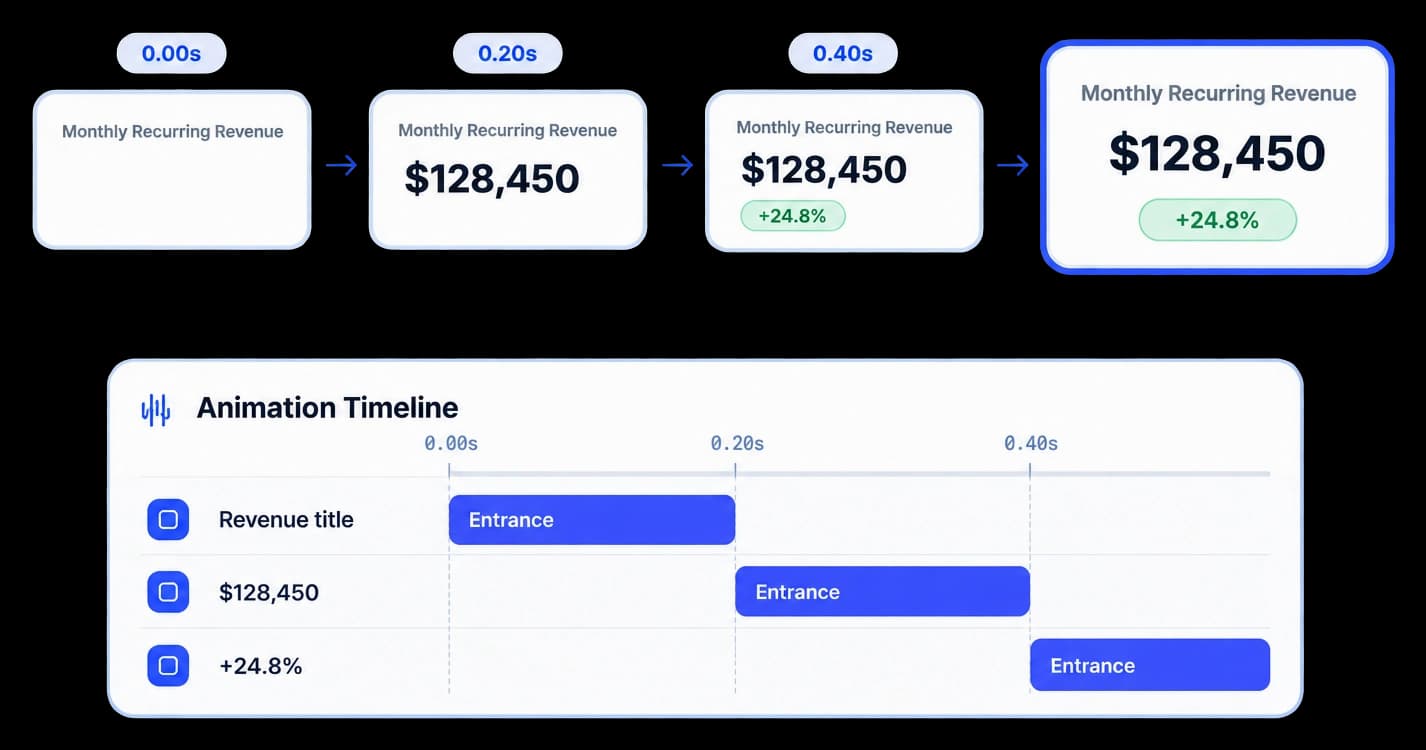
Apply an entrance animation to a group and control the stagger between its elements. The sequence gives each part a moment to register as the scene builds.
Apply an entrance to multiple selected elements.
Adjust the stagger delay between items in the group.
Preview the sequence before applying it to the scene.
In the animation editor
The Create Animation editor supports grouped elements, entrance settings, and a stagger delay. Preview the timing in context, then apply the animation when it reads well.
Inside the workflow
Choose the elements, set their entrance timing, and play the preview to see the order unfold.
Choose the canvas items that should enter as one group.
Set the stagger delay and other entrance values in Create Animation.
Watch the group appear, then apply the animation when the pace feels right.
Product video
Record the control, the change it makes, and the result on screen.
cinematic-staggered-reveal.mp4Where it helps
A stagger helps viewers take in a group of visual details one at a time.
Product marketing
Sales teams
Customer education
A few useful details
Yes. Select a group and set its stagger delay in Create Animation.
The editor includes entrance, path, timing, and preset controls for the selected group.
Yes. Play the animation preview before applying the changes.

Build interactive walkthroughs, personalize prospect links, and export 60 FPS motion videos without writing code or waiting on engineering.