Interactive demos for every stage of the buyer journey.

Record product walkthroughs, build Flows that ask questions and open the right demo, and export Motion Studio videos—then measure what converts.
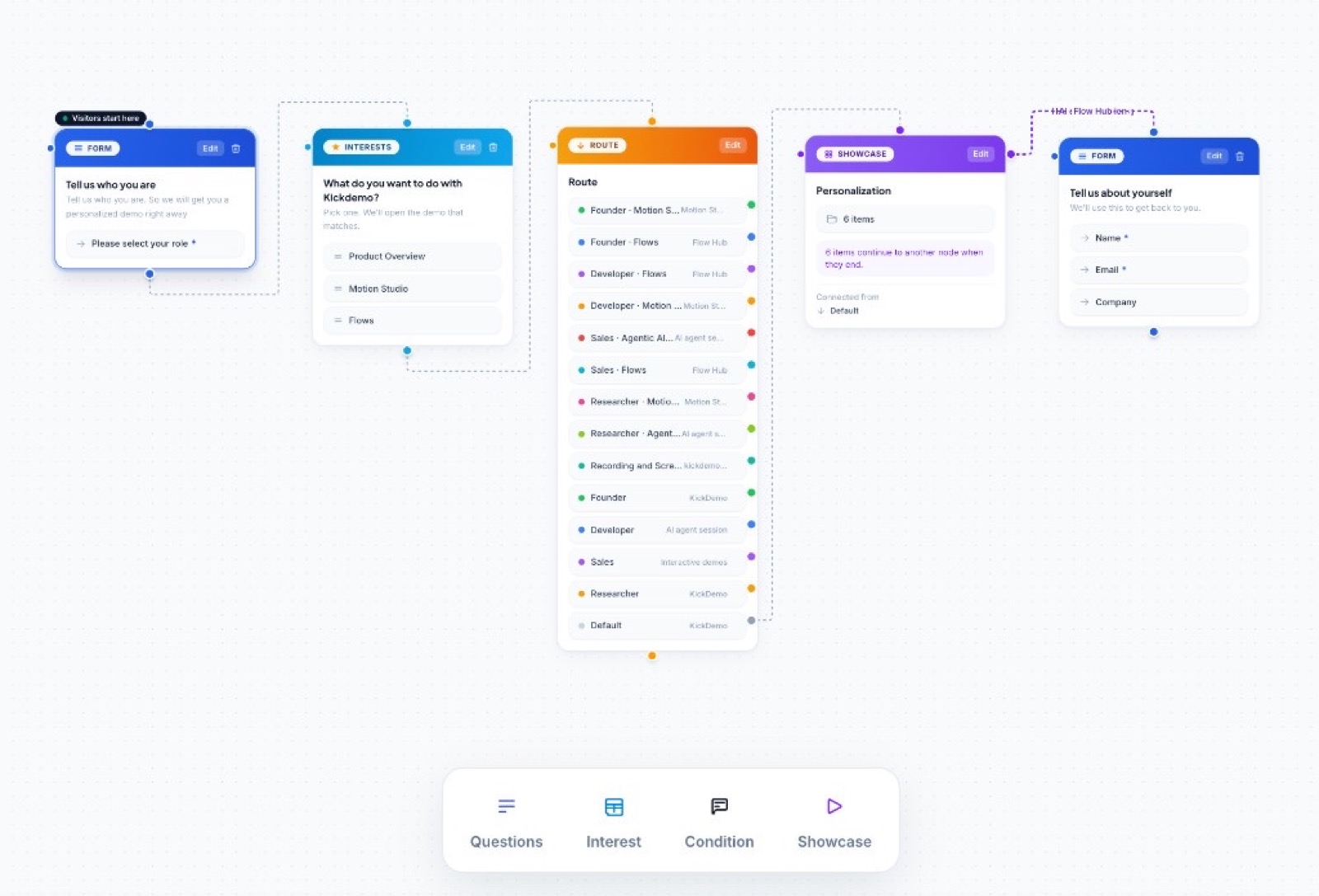
Route each visitor: Flows in Kickdemo

Flows

Route each visitor

Ask questions, branch on answers, and open the demo that fits.

Everything you need to show, sell, and teach your product

Create interactive demos, screen recordings, voiced walkthroughs, and AI Demo Agents in one workspace. Then personalize, share, and measure them everywhere.

StepTeam settingsInvite teammateMaya OrtizAdminJon ParkEditorNew teammateInvitedRequire approval for new members1 · Invite your team2 · Turn on approvals

Interactive & Sandbox Demos

Let buyers click through your real product, guided or free-roam, without touching production.

Replaces·Interactive demo builders, sandbox environments, product tour tools

CapturedREC4KNarration

Screen & Video Recordings

Record polished 4K product videos with your screen, webcam, and narration. No second tool.

1Open Settings2Add a payment method3Save and confirmMP4

Voiceover on every frame

Add an AI voice or record your own, frame by frame. Export the walkthrough as a finished video.

Does it connect to our CRM?Yes. Here is the 40-second walkthrough.CRM sync demoInteractive · 40sOpen demoLead signalHigh intent

AI Demo Agents

A product expert on every visit. It answers questions, opens the right demo, and flags buyers who are ready.

Visitor askedTeam size?SoloQuick tourTeamFull demoEnterpriseSales call

Flows that route each visitor

Ask one question, then send people to the demo that fits. Solo users and enterprise teams see different tours.

Camera: push inVoice-over addedExport 4K videoTitleScreenVoice

Motion Studio

Turn a recording into a launch video. Edit scenes, camera moves, and voice-over on one timeline.

01 RECORD02 ROUTE03 ENGAGE04 MEASURE60 FPS4K · MP4 / WebMIntent 8201 Record02 Edit & personalize03 Share, export & track4+ tools → 1 workspace

Record it. Show it. Route it. Ship the video.

Click-through demos

Turn a recording into a guided tour. Share it with a link.

See how it works
KickDemoINTERACTIVE TOURSaved
EditPlay
1 / 102 / 103 / 104 / 10
Voiceover</> EmbedShareExport
DEMO STEPS
Step 1 of 10Step 2 of 10Step 3 of 10Step 4 of 10
INTRO SCREEN
KickDemo
Interactive Demos
Flows
Form Leads
Kickdemo
Overview
Interactive Demos
Motion Studio
Flows
Video Guides
Screenshots
Recordings
Your Motions
Form Leads
GENERAL
CAPTURES
Search your demos, hubs, leads, walkthroughs…
INTERACTIVE WORKSPACE
Capture & Share Interactive Tours
with 60fps Smooth Motion
10/10 ready
Interactive Demos
2 published
Flows
4 responses
Form Leads
Recent Interactive Demos
KickDemo
12 screens · Guided tour
Product tour
9 screens · Guided tour
Onboarding
14 screens · Guided tour
Your Walkthroughs
Open Interactive Demos
Follow this highlighted control to continue the walkthrough.
Open Flows
Follow this highlighted control to continue the walkthrough.
Open Form Leads
Follow this highlighted control to continue the walkthrough.
Click anywhere to start

Screen recordings

Record once. Trim, zoom in on every click, and send.

See how it works
Kickdemo
Owner
GENERAL
Overview
Interactive Demos
Motion StudioBeta
Flows
Video Guides
CAPTURES
Screenshots
Recordings
Your Motions
Form Leads
KickDemo/Recordings
AI credits 4,999/5,000Search or jump to…+ New DemoJD
Recordings
KickDemo
John doe · 4h ago
1 viewShareOpenDownloadDelete
Kickdemo
Overview
Interactive Demos
Motion Studio
Flows
Video Guides
Screenshots
Recordings
Your Motions
Form Leads
GENERAL
CAPTURES
Search your demos, hubs, leads, walkthroughs…
INTERACTIVE WORKSPACE
Capture & Share Interactive Tours
with 60fps Smooth Motion
10/10 ready
Interactive Demos
2 published
Flows
4 responses
Form Leads
Recent Interactive Demos
KickDemo
12 screens · Guided tour
Product tour
9 screens · Guided tour
Onboarding
14 screens · Guided tour
Your Walkthroughs
7:37
1.5×
2×
0:00 / 7:37Cut+ Add zoom
0s2m4m6m7:37
Drag the black edges to trim. Drag cut edges left or right to resize.
EditActivityTranscript
MAKE EDITS
Trim
Drag the black edges on the timeline. Now 0:00 – 7:37.
Text on the video
A short caption
Zoom12 zooms13 zooms13 zooms13 zooms
Auto-detected zooms from your clicks. Click any to adjust position, size, or delete.
#1 · 0:02.56 · 1.5×#2 · 0:04.57 · 1.5×#3 · 0:08.01 · 1.5×#4 · 0:10.54 · 1.5×#13 · 0:03.20 · 1.5×#13 · 0:03.20 · 2×
Share link copied

Flows

Ask one question. Send each visitor to the right demo.

See how it works
Kickdemo
Owner
GENERAL
Overview
Interactive Demos
Motion StudioBeta
Flows
Video Guides
CAPTURES
Screenshots
Recordings
Your Motions
Form Leads
Untitled flowDRAFT/h/untitled-flow
SharePreviewSettingsAnalyticsPublish
Visitors start here
FORMEdit
Tell us about yourself
→ Name *
→ Email *
→ Company
INTERESTS
What topics interest you?
≡ Product overview
≡ Key use cases
≡ Integrations & setup
ROUTE
Route
Path 1
Path 2
Path 3
Default
DEMO
Full product tour
Opens for this visitor
DEMO
Full product tour
Not connected yet
QuestionsInterestConditionShowcase

Launch videos from a prompt

Describe your product. Get a finished motion video.

See how it works
Your MotionsUntitled Motion Studio1 Screen16:99:161:14:3
TimelinePanelSaveExport Video
Empty Screen
Drop a full-page screen template, or build
with widgets and custom elements.
Writing your film…
Book a visit
in two taps.
Patients pick a time, confirm, and get a reminder. Front desk stays quiet.
Try it free
Thursday
9:00 Cleaning
10:30 Check-up
1:15 Whitening
Booked
Reminder sent for 10:30 tomorrow.
Screen 1
Headline
Cards
Other ways to start
Generate a video
Describe your product and we'll write and animate the film.
What does your product do?
Who it's for, the main features, and the one thing viewers should rememberOnline booking for dental clinics. Patients pick a time in two taps and get a reminder.
TryDental schedulingExpense trackingCode security
Product name
Optional
Colors
SubtleSolid
Generate videoGenerate videoWriting your film…Done. 5 screens ready
Uses AI credits · About a minute

An AI editor for your demos

Ask for a change in plain words. It updates every frame.

See how it works
SessionsKickDemo
Frame 2 / 12
ShareSavedFrames (12)Export Video
STUDIO ASSISTANT
Ready
KICKDEMO AI
Replaced “demo hub” with “Demo Hub” across all steps.
Replaced “demo hub” with “Demo Hub”
Change “3 Demos” to “5 Demos”
KICKDEMO AI
Replaced “3 Demos (Unlimited)” with “5 Demos (Unlimited)” across all steps.
Updated 12 framesUndo
Redact sensitive data on this screen
KICKDEMO AI
Blurred the email and account details on this frame.
2 areas blurred
SUGGESTED ACTIONS
Change 80% to 60% along with the connector
Redact sensitive data on this screen
Press Enter to sendChange “3 Demos” to “5 Demos”
KickdemoFeaturesPricingAffiliatesGet started
Plans that grow with your demos
Start free. Upgrade when you need more.
Free
$0/mo
1 Demo
Share links
Recordings
billing@clinic.example
Scale
$29/mo
3 Demos (Unlimited)5 Demos (Unlimited)5 Demos (Unlimited)5 Demos (Unlimited)
Share links
Recordings
billing@clinic.example
Team
$79/mo
25 Demos
Share links
Recordings
billing@clinic.example

World-class product demos, the fast and easy way

Kickdemo icon markkickdemo
3Steps Recorded
Pause
Stop Recording
Cancel Recording

Step 01

Record

Click through any product and Kickdemo turns it into a step-by-step, interactive demo.

Know what's working and who's worth chasing

See how your demos perform, what each prospect keeps returning to, and how engaged their account is. Export the leads to take them wherever your team works.

Demo performance

Step-by-step conversion

Monthly lead distribution2026
Jan
Feb
Mar
Apr
May
Jun
Jul
Aug
Sep
Oct
Nov
Dec
3,508
Impressions
89%
Engaged
83%
Completions
6m 12s
Time spent
Account engagement
5 Active
Dana Reyes
Acme Corp
Allow editAllow share
Marco Liu
BuildingBlocks
Allow editAllow share
Sarah Patel
Quantum Labs
Allow editAllow share
Ava Ortiz
Magnolia Cloud
Allow editAllow share
Noah Kim
Northwind Labs
Allow editAllow share
Granular team role enforcement
Leads & sharing
Kinetic Camera Zooms
Focal easing on every click
60 FPS
4K MP4 Video Export
Crisp walkthroughs
Synced
Multi-Track Timeline
Scenes, voice, and titles
Synced
Studio Spotlight Glow
Cursor follow light
Synced
16:9 & 9:16 Presets
Web and social ready
Synced
Leads from hubs and demosExport to CSV

Common questions

How Kickdemo works, what you can build, and how to share it.

What is Kickdemo?

Kickdemo is an interactive demo platform for recording product walkthroughs, building Flows, exporting Motion Studio videos, and measuring viewer engagement.

Do I need to write code to create a demo?

No. Capture workflows with the Chrome extension, edit steps in the workspace, and publish interactive demos without writing code.

What can I build with Kickdemo?

Interactive product walkthroughs, exploratory sandboxes, Flows that ask questions and route visitors to demos, AI demo agents, and Motion Studio videos for go-to-market.

Can I embed demos on my website?

Yes. Share with a link or embed interactive walkthroughs and Flows on landing pages, docs, and help centers.

Kickdemo CTA banner background

Turn product curiosity into closed-won revenue

Build interactive walkthroughs, personalize prospect links, and capture high-intent buyers without writing code or waiting on engineering.