

See demos at a glance
Review how many Interactive Demos are ready in the workspace.
Lead AnalyticsWorkspace activity
See demos, Route Hubs, and captured leads in one workspace view.
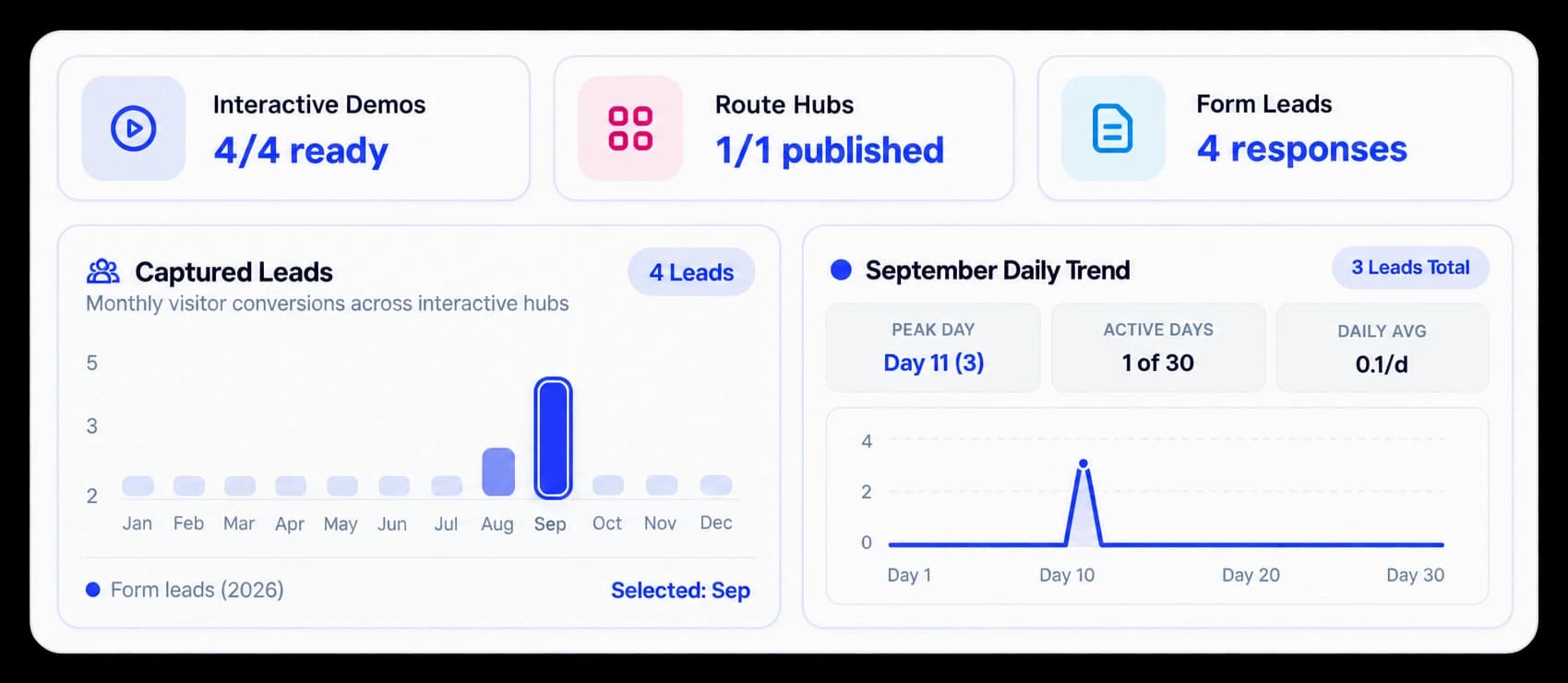
Start with the whole workspace
The dashboard overview keeps Interactive Demos, Route Hubs, and Form Leads in view. A separate Statistic panel shows lead activity so the team can spot what needs attention.
Review how many Interactive Demos are ready in the workspace.
See the Route Hubs count and publication status.
Find the Form Leads response count beside the dashboard charts.
In the workspace overview
The dashboard shows ready demos, published hubs, and form responses beside its lead charts. Use those counts to decide which part of the workspace to open next.
Inside the workflow
Review the summary counts, inspect lead activity, and open the section that needs follow-up.
Start in the KickDemo workspace dashboard.
Check Interactive Demos, Route Hubs, and Form Leads.
Use the captured lead charts and recent leads to choose a follow-up.
Product video
Record the control, the change it makes, and the result on screen.
executive-kpi-metrics.mp4Where it helps
The overview keeps common workspace checks close together for a quick team review.
Workspace owners
Sales teams
Product marketing
A few useful details
The overview includes Interactive Demos readiness, Route Hubs publication, and Form Leads responses.
Yes. The dashboard includes Captured Leads and a daily trend panel.
No. It gives a workspace summary and links into the full areas for more detail.

Build interactive walkthroughs, personalize prospect links, and export 60 FPS motion videos without writing code or waiting on engineering.